Showing posts with label Selenium. Show all posts

All about Cucumber for Selenium

There is a term Behavior Driven Development (BDD) (Read more),
Cucumber is framework which facilitate BDD in your development environment.
In most of the software organization there are various collaborative groups, we as a tester comes in technology group, which closely work with various software technologies and understand most of the software terminologies.
But there are many group which are closely working with business, and may not have much insight of software technology/terminology in spite of that most of the software development requirements come from this group.
Those requirements are basically the required behavior of the software which they describe in the form of various business scenarios.
Consider you are assigned to create Funds Transfer module in a Net Banking application.
There may below scenarios to develop/Test
  • Fund Transfer should take place if there is enough balance in source account
  • Fund Transfer should take place if the destination a/c details are correct
  • Fund Transfer should take place if transaction password / rsa code / security authentication for the transaction entered by user us correct
  • Fund Transfer should take place even if it's a Bank Holiday
  • Fund Transfer should take place on a future date as set by the account holder
Now technology team would start to code to fulfill the scenarios, and we as a tester, test it against given scenarios and further automate those with various tools like selenium.
If we code our test in TestNG like frameworks, we could have many tests, and respective results for those test.
But here we miss the mapping of the business scenarios and automated test.
OK if I could create some document to map tests with scenarios it would be extra activity and having chances to miss some of them as we always do :)
Here comes Cucumber, which helps you to write Scenario in plain formatted English and bind them to your automated tests.
Cucumber provides you way to write you business scenarios in standard format as below
Given I am accessing it with proper authentication
When I shall transfer with enough balance in my source account
Or I shall transfer on a Bank Holiday
Or I shall transfer on a future date
And destination a/c details are correct
And transaction password/rsa code / security authentication for the transaction is correct
And press or click send button
Then amount must be transferred
And the event will be logged in log file
isn't is more meaningful and easy to read and understand? it is as good as writing document for the given module.
Let's start to implement Cucumber for our Selenium based tests.
  • Create a Maven Project.
  • add below dependencies in you pom.xml
 <dependency>
    <groupId>org.seleniumhq.selenium</groupId>
    <artifactId>selenium-java</artifactId>
    <version>RELEASE</version>
</dependency>

<dependency>
    <groupId>io.cucumber</groupId>
    <artifactId>cucumber-java</artifactId>
    <version>RELEASE</version>
</dependency>
<dependency>
    <groupId>io.cucumber</groupId>
    <artifactId>cucumber-junit</artifactId>
    <version>RELEASE</version>
</dependency>
<dependency>
    <groupId>junit</groupId>
    <artifactId>junit</artifactId>
    <version>RELEASE</version>
</dependency>
Now lets start the actual coding,
To make it simple add 2 separate packages in our source, one for Cucumber scenarios and other for Java bindings for scenarios.
Bindings for Cucumber scenarios are also called as Glue Code as it works as glue in between your Software Automation & English like Scenarios
Lets write a scenario for login the application http://seleniumbyneeds.github.io/resources/e2
Create file "LoginFeature.feature" in package "scenarios" and add below lines in the file.
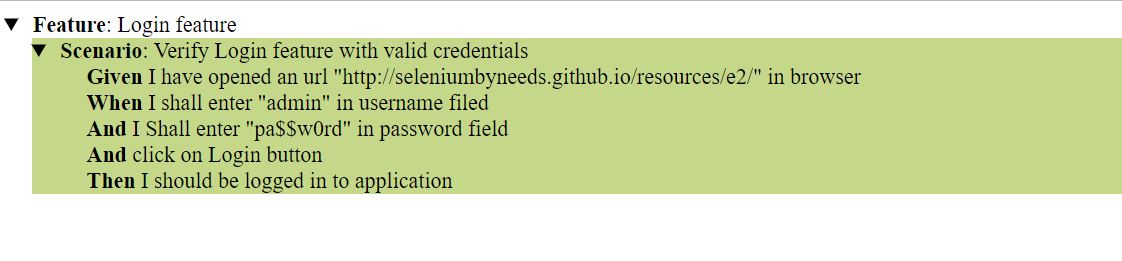
Feature: Login feature

Scenario: Verify Login feature with valid credentials
Given I have opened an url "http://seleniumbyneeds.github.io/resources/e2/" in browser
When I shall enter "admin" in username filed
And I Shall enter "pa$$w0rd" in password field
And click on Login button
Then I should be logged in to application
As scenario is itself descriptive enough to understand, here we are fetching the url and adding username & password to login.
Let's create glue-code for this feature. add "LoginFeature.java" class in package "glue". add below code in the file. please change the package name as per your project setup.
 

import cucumber.api.java.en.And;
import cucumber.api.java.en.Given;
import cucumber.api.java.en.Then;
import cucumber.api.java.en.When;
import org.junit.Assert;
import org.openqa.selenium.By;
import org.openqa.selenium.WebDriver;
import org.openqa.selenium.chrome.ChromeDriver;

import java.util.concurrent.TimeUnit;

public class LoginFeature {
    WebDriver driver;
    @Given("I have opened an url {string} in browser")
    public void iHaveOpenedAnUrlInBrowser(String url) {
// running the test in chrome browser, you can choose your favorite or required
        System.setProperty("webdriver.chrome.driver","");
        driver = new ChromeDriver();
        driver.manage().timeouts().implicitlyWait(10, TimeUnit.SECONDS);
        driver.get(url);
    }

    @When("I shall enter {string} in username filed")
    public void iShallEnterInUsernameFiled(String userName) {
        driver.findElement(By.xpath("//input[@id='user']")).sendKeys(userName);
    }

    @And("I Shall enter {string} in password field")
    public void iShallEnterInPasswordField(String password) {
        driver.findElement(By.xpath("//input[@id='password']")).sendKeys(password);
    }

    @And("click on Login button")
    public void clickOnLoginButton() {
        driver.findElement(By.xpath("//input[@id='login']")).click();
    }

    @Then("I should be logged in to application")
    public void iShouldBeLoggedInToApplication() {
        if(driver.findElements(By.xpath("//a[@id='logoutLink']")).size()==0){
            Assert.fail("not logged in");
        }
    }
}

We are almost done... only thing remain is to add a runner class as Cucumber needs Junit runner to run the scenarios/Scenario.
Add class name "Runner.java" and add below code in that.
 
import cucumber.api.CucumberOptions;
import cucumber.api.junit.Cucumber;
import org.junit.runner.RunWith;

@RunWith(Cucumber.class )
@CucumberOptions(features = "src\\test\\java\\features",
        glue = "glue")
public class CucumberRunner {
}

now run the above test runner file. it will run your feature and show results on a console.
You can pass various option in @CucumberOptions as per you requirement. below are some of the important options.

Pretty:

it helps to create various report for the cucumber features, in below example it will create HTML report at given location
 

@CucumberOptions(
features = "src\\test\\java\\features",
glue = {"glue"},
plugin = { "pretty", "html:target/cucumber-reports" },
)


This will generate an HTML report at the location mentioned in the option
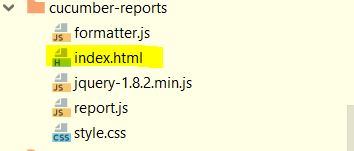
cucmberfiles
HTML Report:
cucmberreport
You can also generate JSON or JUNIT xml report by adding option in cucumber options
Or you can generate all report all together
 
@CucumberOptions(
 features = "src/test/resources/functionalTests",
 glue= {"stepDefinitions"},
 plugin = { "pretty", "json:target/cucumber-reports/Cucumber.json",
 "junit:target/cucumber-reports/Cucumber.xml",
 "html:target/cucumber-reports"}
)

There are still many options features available in cucumber framework. I will try to write on some in coming blog-posts.
Till that time keep Automating..........

Wait for Pop-up

In recent past, I encountered one scenario where you need to automate pop-up in the application. I am blogging this, as many of you may have faced the same issue.
You need to automate the below scenario. There is a link present on the Web-page, Pop-up gets opened as you click on the link & perform some action on this pop-up.
Now you may wonder what's the big deal in just automating above scenario.
I also thought in the same way but my scripts were failing.
After investigation I found that when I tried to switch to pop up it was not there,meaning till that time pop up didn't get open.
I tried to apply Thread.Sleep ,it worked fine for me. But again using Thread.Sleep can cause many issues like -
  1. This may fail if opening a pop up takes longer time
  2. If pop up gets open up in fraction of seconds then it will be waste of time.
  3. It is not the good practice to use Thread.Sleep and be last option we should think of when synchronize the browser.
There is no direct solution or Expected condition available in Selenium WebDriver for this issue. Hence to overcome all these problems I have written a method which implements new Expected condition and exactly behaves like implicit wait.

 
private void clickWaitForPopoUp(WebDriver driver, By by,int waitTime) {
        final int currentWindows = driver.getWindowHandles().size();
        driver.findElement(by).click();
        WebDriverWait wait = new WebDriverWait(driver, waitTime);
        wait.until(new ExpectedCondition<Boolean>() {
            public Boolean apply(WebDriver d) {
                return (d.getWindowHandles().size() != currentWindows);
            }
        });
    }

Now I am calling above method and passing link and wait time when want to click and popup....


Keep automating......

XPATH Basics....


XPATH Basics...


  • XPath is a text syntax for locating parts of HTML document
  • XPath contains a library of standard functions which helps to locate the WebElement
  • XPath is a W3C recommendation

XPath uses path expressions to select WebElement or sets of WebElements in Web page. These expressions look very much like the expressions you see when you work with a traditional computer file system. like c:\MyFolder\another_folder\myFile.txt

XPATH terminologies

Nodes

While using Selenium WebDriver, we come across following three types of nodes
  1. element
  2. attribute
  3. text
Look at below HTML code sample

  • here div, a are element nodes (element is the basically type of WebElement).
  • Attribute nodes for div element is class and its value is myLink
  • "a" element has text nodes as Link to Google, Link to Yahoo, Link to FaceBook

Relationship of Nodes

There are various relations available in XPATH but as a selenium user we must have knowledge of below relations

Children

Element nodes may have zero, one or more children.
above example Google Link, Yahoo Link, and FaceBook Link are Children of div tag which having class myLinks

Descendants

A node's children, children's children, etc. called as Descendants.
Similarly Google Link, Yahoo Link, and FaceBook Link are Descendants of div tag which having class header

Selecting Elements

XPath uses path expressions to select nodes in an Web document. The node is selected by following a path or steps. The most useful path expressions are listed below:
ExpressionDescription
nodenameSelects all nodes with the name "nodename" Example div, a, input, button etc.
/Selects child from the current node
//Selects Descendants from the current element that match the selection no matter where they are
. Selects the current node
..Selects the parent of the current node
@ Selects attributes
In the table below we have listed some path expressions and the result of the expressions:
Path ExpressionResult
/divSelects root level div from the whole page in above example it is div having header class
/div/divSelects all div which are child of root div in above example it is div having myLinks class
//divSelects all div from the page no matter where they are

Predicates

Predicates are used to find a specific node or a node that contains a specific value.
Predicates are always embedded in square brackets.

 
  Page Title


This is a Home Page

This is a paragraph 1. read more

This is a paragraph 2. read more

This is a paragraph 3. read more

This is a paragraph 4. read more

This is a paragraph 1. and its detailed explanation

This is a paragraph 2. and its detailed explanation

This is a paragraph 3. and its detailed explanation

This is a paragraph 4. and its detailed explanation

In the table below we have listed some path expressions with predicates and the result of the expressions for above example

Path ExpressionResult
/div[1]Selects the first div element from the root that is div having id mainMenu Note: In IE 5,6,7,8,9 first node is[0], but according to W3C, it is [1].
//div[@id='mainMenu']/ul/liSelects all the li of ul which is child of div having id as mainMenu
//div[@id='mainMenu']/ul/li[last()]Selects the last li from above explained list of li
//a[text()='Home']Selects all the a(anchor) having text Home
//div[@id='mainMenu']/ul/li[position()<3]Selects the first two li from above explained list of li
On similar line we can use all below listed Predicates as per requirements.
position()Matches the particular position from the list
last()Matches the Last position from the list
text()Get the text node of element
contains(string1,string2)Matches if the string2 contains in string1
starts-with(string1,string2)Matches if the String1 starts with String2
ends-with(string1,string2)Matches if the String1 ends with String2
matches(string,pattern)Matches if the String1 match with given regular expression pattern
upper-case(string)Convert the string to Uppercase
lower-case(string)Convert the String to Lowercase

Selecting Unknown Elements

XPath wildcard character * can be used to select unknown Web elements.
Please contact me via cotact me page and send me queries and suggestions....


Stay cool... & Keep Automating.....

Alternate Way for sendKeys


One of my friend called me yesterday, he had an interview on Selenium WebDriver and got confused on 1 Question.

What is an alternative for sendKeys Method in WebDriver?

I also got stammered on this and thought in mind

Why the hell do we need this?

There are below possible reason that I could find, When we need any alternative to sendKeys.
  1. When the Text element is disabled or locked, sendKeys can not set the value in text field.
    (in my opinion, this is not the correct way of Automation, because the element is locked or disabled by intend to not allow any text insertion)
  2. When we want to write huge text as input... that time the way WebDriver work, by sending Series of characters from String one by one, and Which is Very time consuming. so to minimize that time we can use this alternate method
So now we have above two problems with sendKeys ......

Solution!!!

The best alternative I found is JavaScript

Way 1 to Execute Script

        WebDriver driver = new FirefoxDriver();
        driver.get("http://www.google.com");
        JavascriptExecutor myExecutor = ((JavascriptExecutor) driver);
        myExecutor.executeScript("document.getElementsByName('q')[0].value='Kirtesh';");
        driver.quit();
in above example we have used javaScript to locate the Search Textbox and set the "Kirtesh" value in it.
lets look at another approach.

Way 2

        WebDriver driver = new FirefoxDriver();
        driver.get("http://www.google.com");
        WebElement searchbox = driver.findElement(By.xpath("//input[@name='q']"));
        JavascriptExecutor myExecutor = ((JavascriptExecutor) driver);
        myExecutor.executeScript("arguments[0].value='Kirtesh';", searchbox);
        driver.quit();
second example is very controlled approach, Here we are passing WebElement as a argument to the javaScript
There is still many more remained from JavascriptExecutor ......
Keep Exploring...

Keep Automating..................

Rerun Failed JUnit Tests

Hello Friends,
Many times Selenium tests are getting failed due to no reason... as UI tests are fragile in nature.
There are many uncertainties like slow response, browser issues... and many more.

Generally we use readily available Test frameworks like JUnit & TestNG to write test cases. TestNG framework has lot off cool features like rerun test, dependency test and many more... but still many of us have JUnit as first choice.

Problem!!!!

JUnit frame work does not provide any direct feature to rerun the failed tests. So problem is

How we can rerun Failed test in JUnit?


Solution

JUnit provides a Interface TestRule, by implementing this we can apply rule for running the test. We have used same class to solve our problem, Please have a look below code snippet in which have created Class Retry which implements the TestRule interface.
import org.junit.rules.TestRule;
import org.junit.runner.Description;
import org.junit.runners.model.Statement;

/**
 * Created by Kirtesh on 20-02-2015.
 */
public class Retry implements TestRule {
    private int retryCount;

    public Retry(int retryCount) {
        this.retryCount = retryCount;
    }

    public Statement apply(Statement base, Description description) {
        return statement(base, description);
    }
    private Statement statement(final Statement base, final Description description) {
        return new Statement() {
            @Override
            public void evaluate() throws Throwable {
                Throwable caughtThrowable = null;

                // implement retry logic here
                for (int i = 0; i < retryCount; i++) {
                    try {
                        base.evaluate();
                        return;
                    } catch (Throwable t) {
                        caughtThrowable = t;

                        //  System.out.println(": run " + (i+1) + " failed");
                        System.err.println(description.getDisplayName() + ": run " + (i + 1) + " failed");
                    }
                }
                System.err.println(description.getDisplayName() + ": giving up after " + retryCount + " failures");
                throw caughtThrowable;
            }
        };
    }
}

That's it.. you can directly copy above class & use this rule in your junit test... look in to below test
    @Rule public Retry retry = new Retry(3);
    @Test
    public void myWebDriverTest(){
 driver.get(htmlPath);
 driver.findElement(By.id("user")).sendKeys("MyUser");
 driver.findElement(By.id("password")).sendKeys("myPassword");
 driver.findElement(By.id("login")).click();
 Assert.assertTrue(driver.findElements(By.linkText("Logout")).size()>0);
        driver.quit();
    }
above test will get rerun if it get fails for 3 time, 3 is the number which you can set in @Rule Retry...

Hope this may hep you.....

Keep exploring... Keep automating....

Find Broken Images in Web-Page

Broken Images

Hello Friends....
While testing the web-page, It always happen when page renders properly but Image/Images are not displayed due to incorrect path
Technically images which are not having correct path are called as Broken Images.
Basically Selenium help us to mimic human actions (e.g. clicking, typing, dragging, dropping, etc.)
So how do we use it to test for broken images?

Solution!!!

Selenium WebDriver is not directly equipped with this... but there are several way to do this..
We will use HttpURLConnection Object with selenium to do this.We will need to go through the below steps.

  1. Find all images on the page
  2. Iterate through each image, and find the src attribute and validate with a 404 status code
  3. Store / Notify / Log the broken images path in a collection

HttpURLConnection Example

Please look into below code snippet
import java.net.HttpURLConnection;
import java.net.InetSocketAddress;
import java.net.Proxy;
import java.net.URL;
import java.util.ArrayList;
import java.util.List;

import org.openqa.selenium.By;
import org.openqa.selenium.WebDriver;
import org.openqa.selenium.WebElement;
import org.openqa.selenium.firefox.FirefoxDriver;

public class ImageUtills {
 
 public static List<WebElement> getBrokenLinks(String Weburl) {
  WebDriver driver = new FirefoxDriver();
  driver.get(Weburl);
  List<WebElement> Images = driver.findElements(By.xpath("//img"));
  List<WebElement> brokenImages = new ArrayList<WebElement>();
  
  //Use Proxy if your network is under any proxy server
  Proxy proxy = new Proxy(Proxy.Type.HTTP, new InetSocketAddress("Your Proxy Server", 80));
  for(WebElement image:Images){
   String url= image.getAttribute("src");
   try 
   {
    //You can keep empty if there is no proxy.
    HttpURLConnection http = (HttpURLConnection)new URL(url).openConnection(proxy);
    if(http.getResponseCode()!=200){
     brokenImages.add(image);
    }
   
   } 
   catch (Exception e) {
    brokenImages.add(image);
    e.printStackTrace();
   } 
  }
  
  /// You can further use brokenImages List for display or notify or assert
  return brokenImages;
  
 }

}

Below is Different Response codes and there meanings.. it may help you some where

1xx: Information

Message: Description:
100 Continue The server has received the request headers, and the client should proceed to send the request body
101 Switching Protocols The requester has asked the server to switch protocols
103 Checkpoint Used in the resumable requests proposal to resume aborted PUT or POST requests

2xx: Successful

Message: Description:
200 OK The request is OK (this is the standard response for successful HTTP requests)
201 Created The request has been fulfilled, and a new resource is created
202 Accepted The request has been accepted for processing, but the processing has not been completed
203 Non-Authoritative Information The request has been successfully processed, but is returning information that may be from another source
204 No Content The request has been successfully processed, but is not returning any content
205 Reset Content The request has been successfully processed, but is not returning any content, and requires that the requester reset the document view
206 Partial Content The server is delivering only part of the resource due to a range header sent by the client

3xx: Redirection

Message: Description:
300 Multiple Choices A link list. The user can select a link and go to that location. Maximum five addresses
301 Moved Permanently The requested page has moved to a new URL
302 Found The requested page has moved temporarily to a new URL
303 See Other The requested page can be found under a different URL
304 Not Modified Indicates the requested page has not been modified since last requested
306 Switch Proxy No longer used
307 Temporary Redirect The requested page has moved temporarily to a new URL
308 Resume Incomplete Used in the resumable requests proposal to resume aborted PUT or POST requests

4xx: Client Error

Message: Description:
400 Bad Request The request cannot be fulfilled due to bad syntax
401 Unauthorized The request was a legal request, but the server is refusing to respond to it. For use when authentication is possible but has failed or not yet been provided
402 Payment Required Reserved for future use
403 Forbidden The request was a legal request, but the server is refusing to respond to it
404 Not Found The requested page could not be found but may be available again in the future
405 Method Not Allowed A request was made of a page using a request method not supported by that page
406 Not Acceptable The server can only generate a response that is not accepted by the client
407 Proxy Authentication Required The client must first authenticate itself with the proxy
408 Request Timeout The server timed out waiting for the request
409 Conflict The request could not be completed because of a conflict in the request
410 Gone The requested page is no longer available
411 Length Required The "Content-Length" is not defined. The server will not accept the request without it
412 Precondition Failed The precondition given in the request evaluated to false by the server
413 Request Entity Too Large The server will not accept the request, because the request entity is too large
414 Request-URI Too Long The server will not accept the request, because the URL is too long. Occurs when you convert a POST request to a GET request with a long query information
415 Unsupported Media Type The server will not accept the request, because the media type is not supported
416 Requested Range Not Satisfiable The client has asked for a portion of the file, but the server cannot supply that portion
417 Expectation Failed The server cannot meet the requirements of the Expect request-header field

5xx: Server Error

Message: Description:
500 Internal Server Error A generic error message, given when no more specific message is suitable
501 Not Implemented The server either does not recognize the request method, or it lacks the ability to fulfill the request
502 Bad Gateway The server was acting as a gateway or proxy and received an invalid response from the upstream server
503 Service Unavailable The server is currently unavailable (overloaded or down)
504 Gateway Timeout The server was acting as a gateway or proxy and did not receive a timely response from the upstream server
505 HTTP Version Not Supported The server does not support the HTTP protocol version used in the request
511 Network Authentication Required The client needs to authenticate to gain network access

Hope you learn something from this post...


Keep Automating........

Selenium WebDriver WebElement Selectors

Hello friends.. 

This would be very besic topic for experianced people, but may help WebDriver new bees.

Basically whenever we interacting with Browser Application through WebDriver, we always need to identify the web-elements like Text-Box, Buttons, List, Dropdown, Menu, Link, Checkbox.. etc.
        We use FindWebElement / FindWebElements method to locate/find Web-Elements, with different selectors.
        But I will also like to mention here that as a Web-Application Tester, we should have basic knowledge of HTML & CSS, which definitely help us to take judgement on selectors to find the Web-Elements. 

Please go through below links to learn HTML / CSS

HTML Tutorials

CSS Tutorials

Below is the list of selectors provided by WebDriver.
  • By.className
  • By.cssSelector
  • By.id 
  • By.linkText
  • By.name
  • By.partialLinkText
  • By.tagName
  • By.xpath


Today i am going to explain some of the listed selectors.

By.className

              This Method takes Class Name as String and Finds elements based on the value of the "class" attribute of the web element. 
If an element has many classes then this will match against each of them. 

For example if the value is "one two onone", then the following "className"  will match: "one" and "two" 
Have a look at below html snippet which may present on any Web Page


<div class="displaydiv"> <div class="boldText">My List Items</div> <ul> <li> <div class="boldText listItem">First Item</div> </li> <li> <div class="boldText listItem">Second Item</div> </li> <li> <div class="boldText listItem">Third Item</div> </li> <li> <div class="boldText listItem">Fourth Item</div> </li> <li> <div class="boldText listItem">Fifth Item</div> </li> </ul> </div>  If we want to select all list items from the list, by using ByClassName Selector, we should use class "listItem" because "bolderText" class is also applied to List header. 

So in this case our WebDriver selector statement will look as follow 

1 List<WebElement> listItems = driver.findElements(By.className("listItem"));

By.cssSelector

While using CssSelector we should know basics of Cascaded Style Sheets.
Please go through below links to learn HTML / CSS

HTML Tutorials

CSS Tutorials


Let's have some basics on the css.
  •     .(dot) is used for selecting the elemnts having the specified css class
  •     #(hash) is used for selecting the element having specified Id
  •     we can directly add Tag Name to select all the specified tags in the web page.
so for above given example we are selecting element by class name so our selector statement will be
   
1 List<WebElement> listItems = driver.findElements(By.cssSelector(".listItem"));
   
we can also use below syntax if we have the single list in whole web page

1 List<WebElement> listItems = driver.findElements(By.cssSelector("li div"));

here selector finds div whch are chield of li directly by tag name of web element


By.id &By.name

These two selectors are quite simple and straight forward as they are.  
By.id selector selects the element having specified id and similarly By.name selectors selects the web element having specified name. 


By.linkText

This Selector used to select the anchors(Links) from the web-page.
It selects the link on the basis of the text contains by the link. consider below HTML snippet

<div> <a id='myLink' href='http://www.google.com'> Link to Google</a><br/> <a id='myLink' href='http://www.yahoo.com'> Link to Yahoo</a><br/> <a id='myLink' href='http://www.rediff.com'> Link to Rediff</a> </div>

above code will render on web-page like below


Now to click the link of www.yahoo.com with linkText selector below statement needed 

1 driver.findElement(By.linkText("Link to Yahoo")).click();


By.partialLinkText

As selector name it self suggests, it can select the Anchors(Links) by it's partial text.
lets consider previous HTML snippet, if i want to select any link with partialLinkText selector, I need to give partial text of the link, check below snippet which will select the www.google.com link

1 driver.findElement(By.partialLinkText("Google")).click();


if I write below statement.

1 driver.findElement(By.partialLinkText("Link")).click();

it will point to all links, as all links are having text "Link", but as we are using .findWebElement  so it will point to first link in DOM, that is link to www.google.com


By.tagName

continued....